AE&D Software
BEANalyzer UltraPro
A professional Toyota/Lexus BEAN MPX laboratory for capturing, decoding, visualizing, logging, replaying and transmitting multiplex traffic from the golden era of Toyota electronics.
Buy & Download
*Available for: Windows and MacOS
Toyota / Lexus BEAN MPX Laboratory
Not just a serial monitor. A complete research environment.
Built for reverse engineering, restoration, retrofit development, dashboard research, embedded gateway projects and serious Toyota/Lexus electronics work.
Major announcement • Coming Soon
BEANalyzer UltraPro 5 is on the way. The best move right now is to buy the current UltraPro and save almost 50%.
The next generation of BEANalyzer UltraPro is coming soon, and the official preview is already available. For customers who want serious BEAN MPX tooling now, the current BEANalyzer UltraPro remains the best-value way to enter the ecosystem before the final UltraPro 5 price arrives.
Smart timing for serious users
Buy the current version now and take advantage of the launch window.
Customers can get BEANalyzer UltraPro today, start working immediately with a professional Toyota/Lexus BEAN MPX laboratory, and save almost 50% compared with the final BEANalyzer UltraPro 5 price.
*Save almost 50% compared with the final BEANalyzer UltraPro 5 price.
Next-generation platform
UltraPro 5 is coming. Make the most of the current offer now.
Use the upcoming release to build momentum: highlight the future with UltraPro 5, while turning that excitement into immediate sales for the current BEANalyzer UltraPro.
Product overview
Turn hidden BEAN MPX traffic into readable engineering data.
BEANalyzer UltraPro connects to an external BEAN MPX interface, typically an Arduino-based adapter, through USB Serial. From there, it transforms raw Toyota/Lexus multiplex traffic into a structured workspace where messages can be searched, decoded, compared, graphed, recorded, replayed and used for gateway development.
Vehicle BEAN MPX network
→
Arduino / BEAN MPX adapter
→
USB Serial
→
BEANalyzer UltraPro
→
Optional CAN gateway / exported logs
Built for Toyota/Lexus enthusiasts and tuners, by enthusiast tuners.
Purpose-built for builders who modify, retrofit and push classic Toyota/Lexus electronics further.
BEANalyzer UltraPro was created for the people building real projects around classic Toyota and Lexus platforms: ECU tuners, swap builders, retrofit developers, dashboard hackers, restoration nerds and automotive electronics enthusiasts who want the car to evolve without losing its original soul.
Aftermarket ECU and engine swap development
When an aftermarket ECU, standalone controller or engine swap changes the original electronic ecosystem, BEANalyzer UltraPro helps you study the factory BEAN MPX traffic so you can understand which OEM messages keep the dashboard, body electronics, climate panel and warning logic alive.
Keep OEM functions while adding your own
Use captured and decoded messages to design hardware and software that preserves factory behavior, restores missing signals, bridges old multiplex data into new modules, or adds custom functions without turning the wiring loom into modern art gone wrong.
Visual electronics, retrofits and custom modules
Ideal for custom dashboards, CAN displays, warning indicators, comfort upgrades, body-control experiments, lighting logic and any electronic visual modification where you need the car to talk properly instead of guessing blindly with a multimeter and hope.
Graphical interface
A clean GUI for serious BEAN MPX work.
BEANalyzer UltraPro keeps the workflow visual and practical: live capture, decoded dashboard cards, fixed-row message monitoring, DBC editing, manual transmission, replay tools and BEAN-to-CAN gateway controls are all available from one desktop interface. It is simple enough to use in the car, but complete enough to document real reverse-engineering sessions without going full chaos-terminal mode.
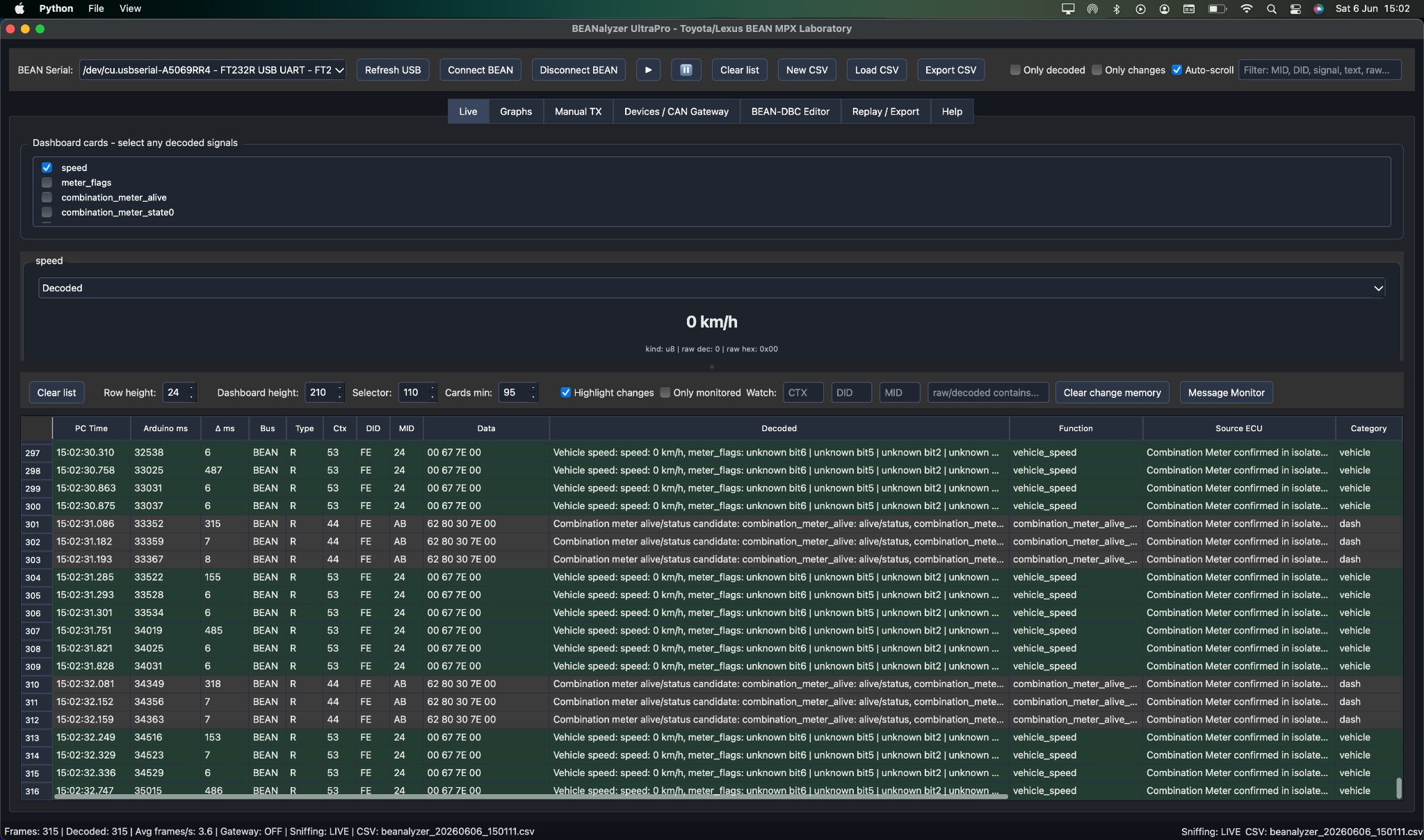
Live workspace
Live capture and decoded dashboard
Connect the BEAN serial adapter, capture live traffic, filter frames, highlight changes and keep decoded values visible as dashboard cards. Perfect for quick tests such as opening doors, pressing switches, changing climate settings or watching speed frames update in real time.
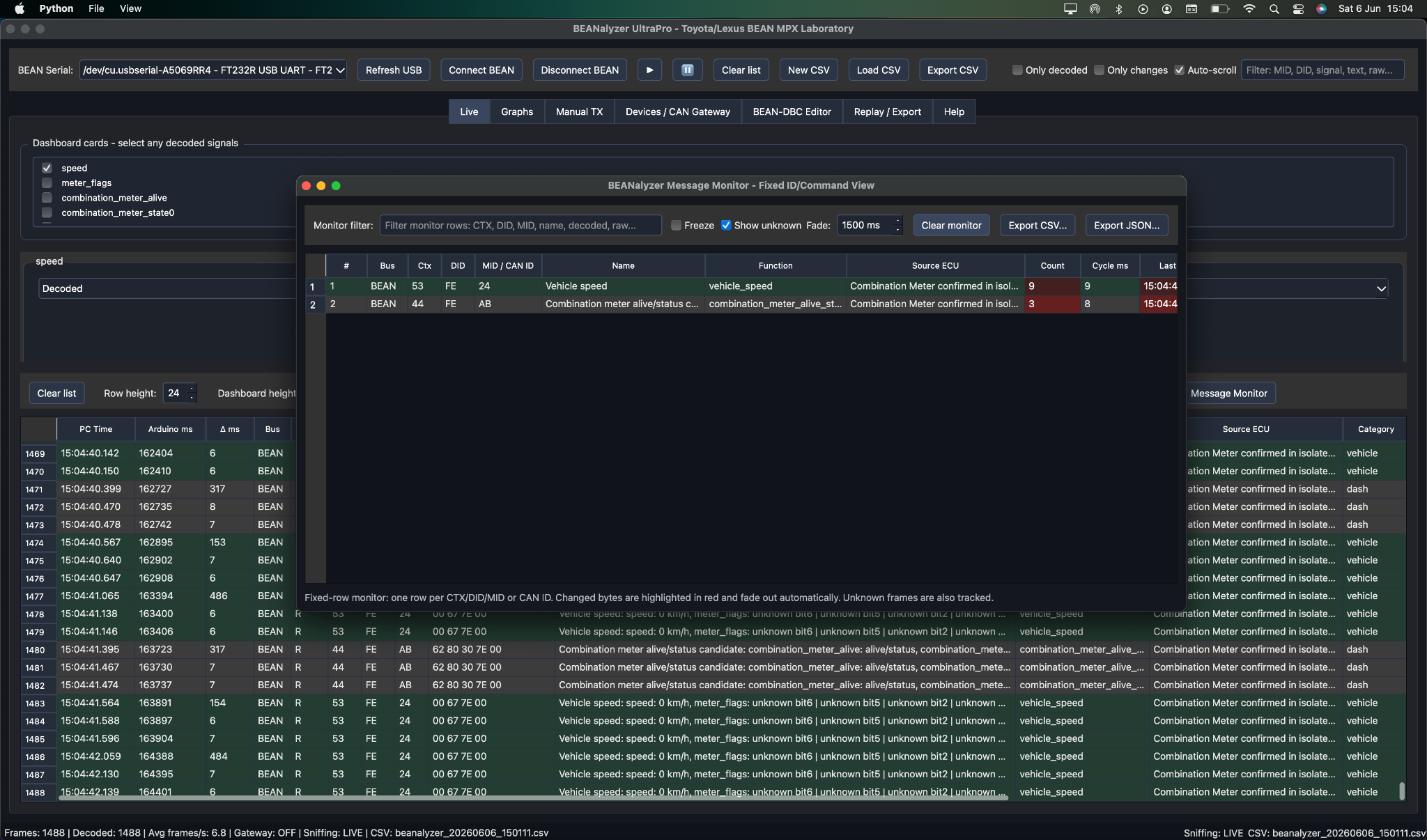
Fixed-row analysis
Message Monitor
Groups frames by context, DID and MID so each command stays on one stable row. Byte changes are highlighted as they happen, making unknown messages much easier to identify than in a normal scrolling terminal.
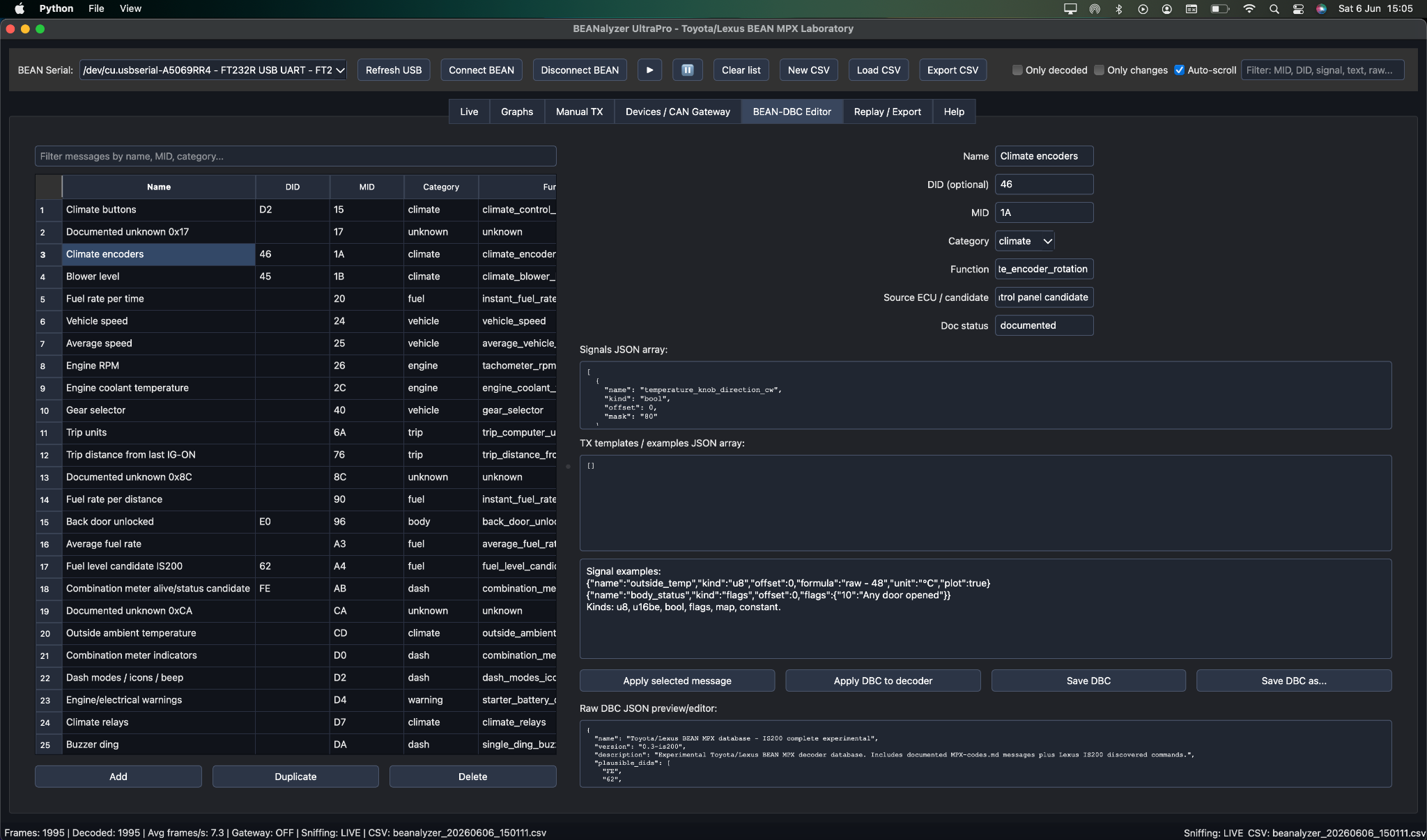
Decoder database
BEAN-DBC Editor
Create and maintain the BEAN MPX decoder database directly from the app. Define DID, MID, category, function, ECU candidate, documentation status and JSON signal definitions for values, flags, formulas and notes.
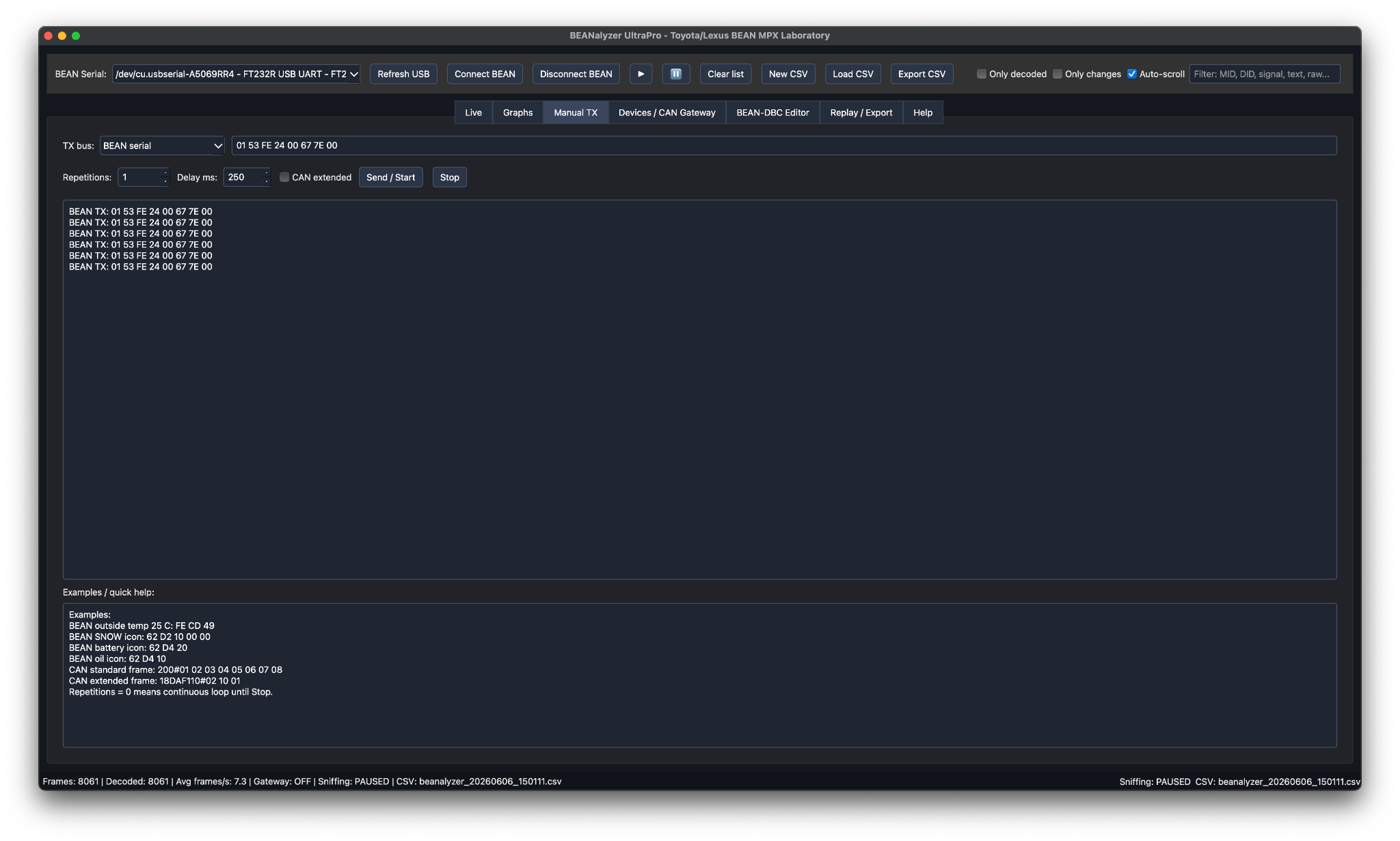
Controlled transmission
Manual BEAN / CAN TX
Send single or repeated BEAN MPX commands and CAN frames from a controlled panel. It includes bus selection, repetition count, delay control and a transmission log, making it useful for bench testing, isolated modules and adapter validation.
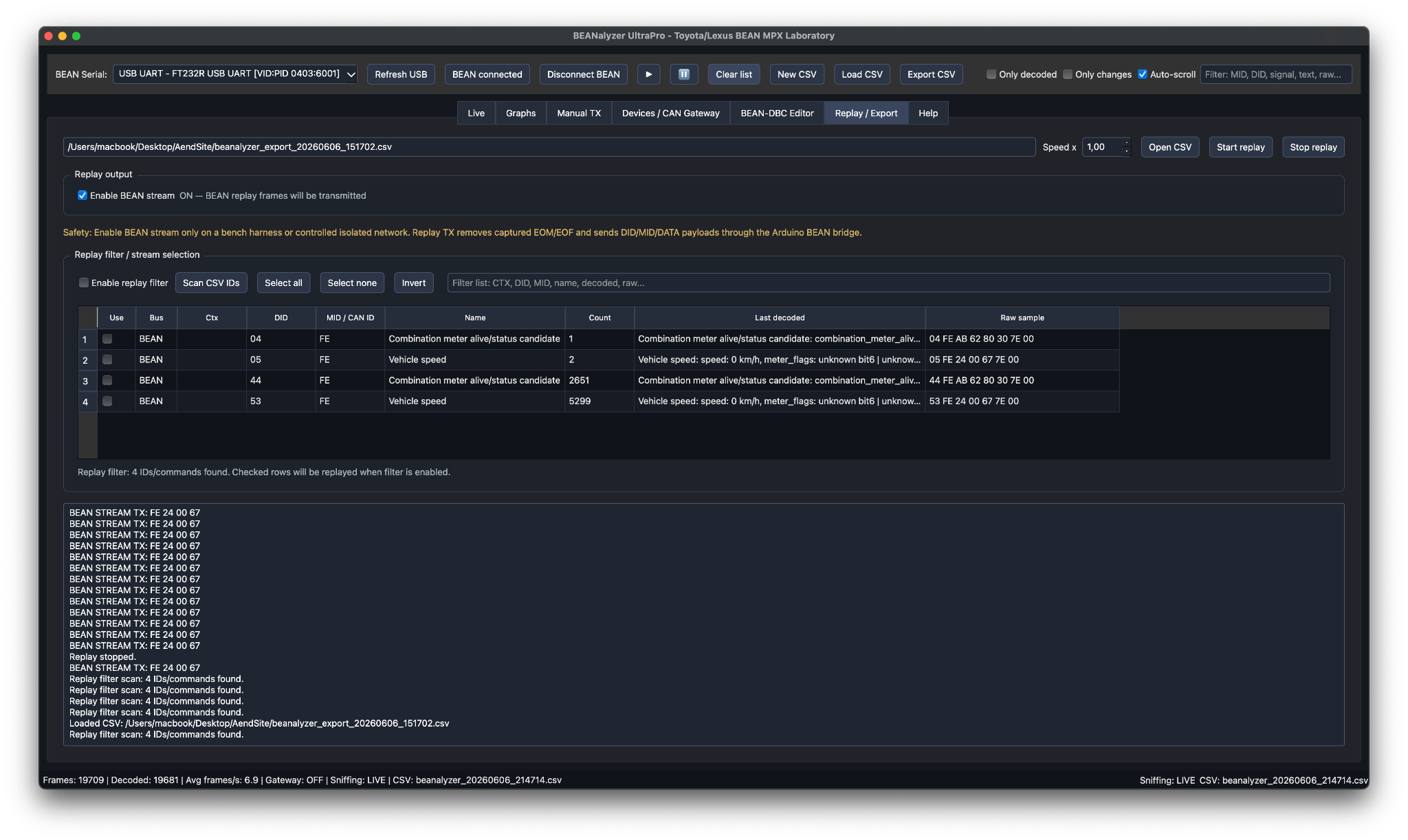
Offline research
Replay / Export
Load a recorded CSV session and replay it without the vehicle connected. This turns road tests and bench captures into reusable data, ideal for refining decoder rules, comparing sessions and documenting discoveries later.
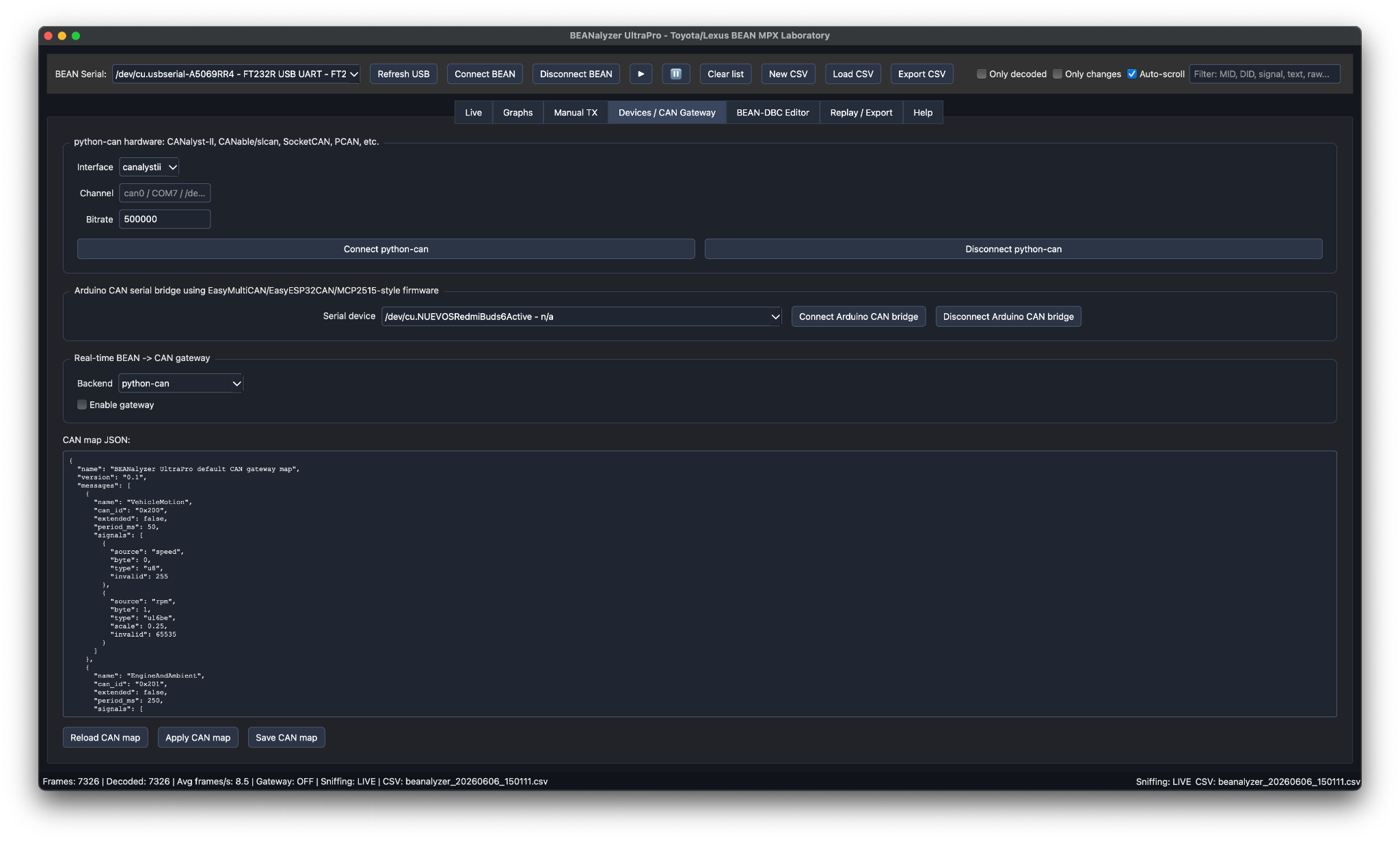
Gateway lab
Devices / CAN Gateway
Configure python-can interfaces, Arduino CAN serial bridges and real-time BEAN-to-CAN mappings. This is where decoded BEAN MPX values can become CAN frames for custom dashboards, loggers, retrofit modules and embedded experiments.
Core features
Everything needed to investigate, decode and document Toyota/Lexus BEAN MPX.
Live BEAN MPX capture
Capture frames in real time with PC timestamp, Arduino timestamp, bus type, frame context, DID, MID, data bytes and raw frame visibility.
Human-readable decoding
Decode known messages into useful values such as speed, outside temperature, warning states, door status, seat belt status and body electronics signals.
BEAN-DBC JSON database
Extend the decoder with message names, functions, categories, signals, byte offsets, formulas, bit flags, known values and ECU candidates.
Advanced message monitor
Keep one fixed row per BEAN command or CAN arbitration ID. Watch byte changes highlight in real time instead of chasing endless terminal spam.
Byte and bit change watcher
Compare previous and current frames, identify changed byte indexes, decimal/hex/binary transitions and the exact bits that moved.
Dashboard cards and graphs
Build a clean live dashboard with selected decoded values and plot numeric signals over time for research, testing and validation sessions.
CSV and JSON logging
Save complete capture sessions for spreadsheet analysis, structured research, versioned decoder development and repeatable documentation.
Replay mode
Load previous sessions and analyze them later without the vehicle connected. A single capture becomes reusable research material.
Manual BEAN and CAN transmission
Send individual or repeated BEAN MPX commands and CAN frames for controlled bench testing, module research and development workflows.
Gateway development
Designed for BEAN-to-CAN experiments and custom automotive tooling.
BEANalyzer UltraPro can support research workflows where decoded BEAN MPX values are mapped into CAN frames for custom dashboards, loggers, retrofit ECUs, Arduino projects, ESP32 projects and instrumentation modules.
CAN interface paths
Designed for CANalyst-II, CANable/SLCAN, SocketCAN, PCAN-compatible interfaces, Arduino + MCP2515 bridges and ESP32 TWAI/CAN serial bridges.
Arduino and ESP32 friendly
Ideal for EasyMultiCAN-based MCP2515 projects and EasyESP32CAN-style TWAI bridges where low-cost hardware needs serious software around it.
Research tool, not a toy
Transmission on a live vehicle network must be performed with care. Use isolated modules, bench harnesses and controlled test procedures before touching a complete car.
Hardware adapter ecosystem
Use open Arduino tooling to build the sniffer and bridge hardware.
BEANalyzer UltraPro is designed to work with an external BEAN MPX adapter through USB Serial. For hardware experiments, sniffers and gateway prototypes, these GitHub libraries are the recommended starting point: BeanMPX for the Toyota/Lexus BEAN side and EasyMultiCAN for MCP2515-based CAN bridges.
BeanMPX Arduino library
Arduino library for Toyota/Lexus BEAN MPX communication and sniffer adapter development. Use it as the BEAN-side foundation for reading, transmitting and experimenting with the vehicle multiplex bus.
Open BeanMPX on GitHubEasyMultiCAN library
Maintained MCP2515 CAN library for Arduino-based CAN bridges, gateways and BEAN-to-CAN experiments. It is the recommended CAN-side library for hardware that forwards decoded BEAN values into custom CAN frames.
Open EasyMultiCAN on GitHubCompatibility
Built for the Toyota/Lexus multiplex era where BEAN MPX, AVC-LAN and CAN coexist.
BEANalyzer UltraPro is focused on late 1990s and early/mid 2000s Toyota and Lexus platforms using BEAN MPX body multiplexing. Confirmed or highly relevant research targets include classic Lexus IS, GS, LS, SC, RX, GX and LX platforms, plus multiple Toyota platforms from the same electronic generation.
Operating systems
Windows and macOS.
Serial adapters
Arduino-based BEAN MPX bridges and custom USB Serial interfaces.
CAN integrations
Optional CAN tooling for logging, gateways and development workflows.
BEANalyzer UltraPro
Classic Toyota/Lexus multiplex research, finally with proper tools.
For anyone decoding the invisible nervous system of a classic Toyota or Lexus, this is the difference between guessing in the dark and working like an engineer.